Instant Access
Sign in with your registered email and password to reach your GBP balance, active bonuses and the full game catalogue in seconds.
Login at CrownJewelz in the UK: Mobile Account Access
Access your account securely from any browser or the Android app. Your GBP balance, bonuses and game history are waiting.
Keep Your Account Safe
What You Should Do
What You Should Avoid
Your CrownJewelz Account
Instant Access
Sign in with your registered email and password to reach your GBP balance, active bonuses and the full game catalogue in seconds.
Secure Session
Each login is protected by SSL encryption. Two-factor authentication is available in account settings for an extra layer of security.
Play on Any Device
Your CrownJewelz account works in any modern mobile browser and in the Android APK, with no separate credentials needed.
Signing in to CrownJewelz uses your registered email address and the password you set during registration. There is no social login or third-party authentication at present; all access goes through the credentials attached to your account. If you registered using a particular email provider, that is the address to use each time. Two-factor authentication can be activated from the security section of your account settings, sending a one-time code to your mobile device on each sign-in.
The sign-in process is the same whether you are connecting from a desktop browser, a mobile browser or the Android app, though the layout adjusts to the screen size.
Navigate to crownjewelz.io and click the LOG IN button in the top right corner of the page. Enter your registered email address in the first field and your password in the second, then click to confirm. If two-factor authentication is enabled, a verification code will be sent to your registered mobile number and must be entered before the session opens. Your account dashboard, GBP balance and any active bonus offers load immediately after a successful sign-in.
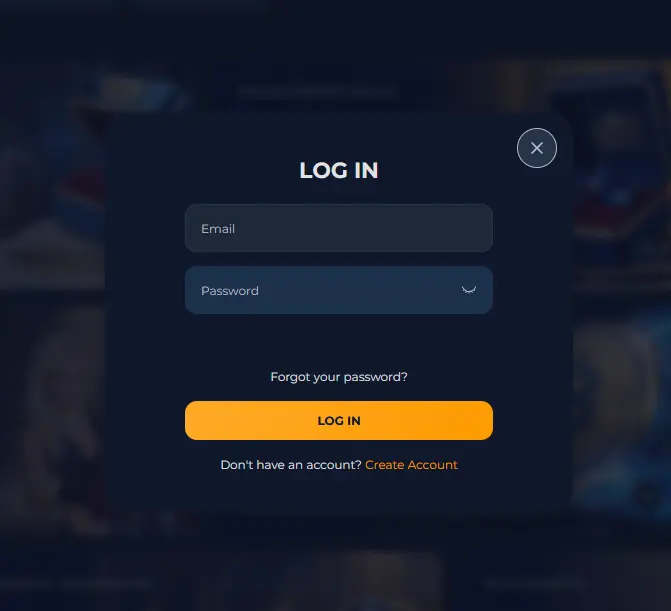
Open your preferred mobile browser on Android or iOS and go to crownjewelz.io. The site detects the screen size and serves the mobile layout automatically. Tap LOG IN in the top navigation, enter your credentials and confirm. The full catalogue of slots from Pragmatic Play and NetEnt, as well as the Evolution Gaming live tables, is accessible from the mobile browser without any installation required.
Android users who have downloaded the CrownJewelz APK from the official website open the app, tap LOG IN on the home screen and enter the same email and password used on the website. The APK uses the same account as the browser; there is no separate app-only registration. iOS users access the casino through a PWA (Progressive Web App) saved to the home screen via the mobile browser, which behaves like a native app while running within Safari.
Every CrownJewelz session runs over an SSL-encrypted connection, meaning the credentials and financial data you transmit cannot be intercepted in transit. The account password is stored in hashed form and is never visible to support staff. Two-factor authentication adds a second verification step that prevents unauthorised access even if a password is compromised.
Players are responsible for keeping their login details confidential. CrownJewelz support will never ask for your password during a live chat or email exchange. If you receive a message requesting your credentials, treat it as suspicious and report it to the team at [email protected].
Several situations can prevent a successful sign-in, most of which are resolved quickly.
If the password is not accepted, confirm that Caps Lock is off and that you are entering the email address exactly as registered, including any dots or plus signs. Use the forgotten password link on the login screen to receive a reset email if needed. The reset link expires within a limited window, so act on it promptly.
If your account appears locked, this is usually the result of multiple failed password attempts and is a security measure rather than a ban. Contact the live chat team directly to confirm your identity and have the lock removed. Have your registered email address and, if possible, a piece of identity documentation ready to speed up the process.
If two-factor authentication codes are not arriving, check that your phone has a signal, that the registered number is correct and that the code has not been filtered into a spam or blocked messages folder. If the problem persists, contact [email protected] for assistance.
Browser-related issues such as a blank login screen or a form that will not submit are usually resolved by clearing the browser cache, disabling browser extensions temporarily or switching to a different browser.
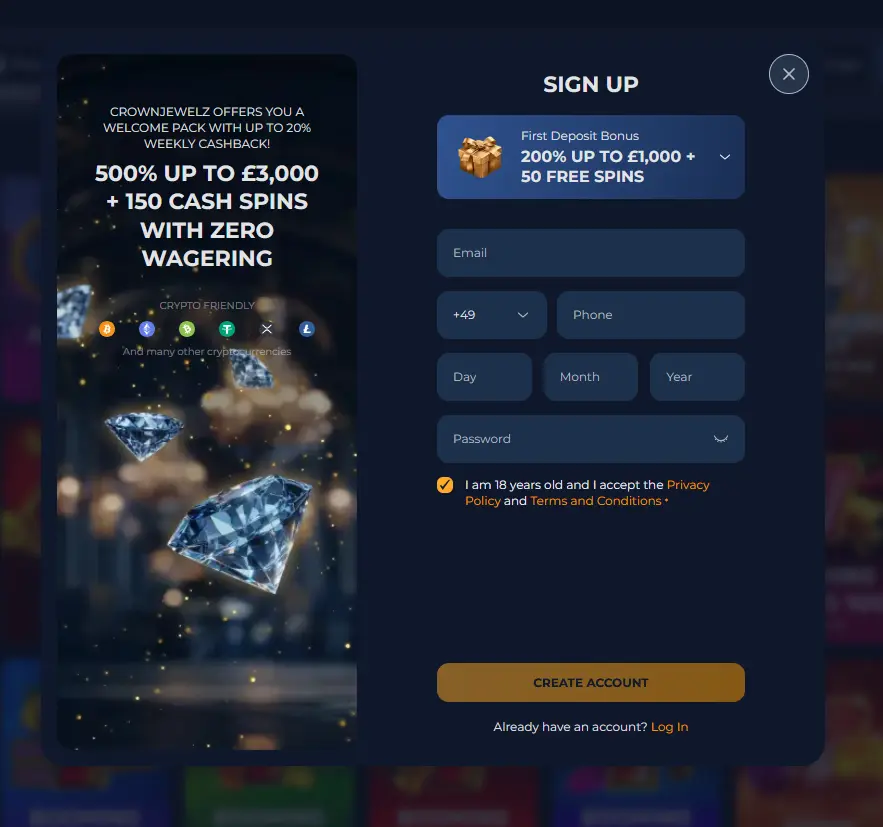
Registration at CrownJewelz is straightforward and takes only a few minutes. You will need to provide your name, date of birth, address and a valid email address. A password is set during sign-up, and identity verification is completed before your first withdrawal is processed. All new players must be aged 18 or over. Once your account is open, the zero-wagering welcome bonus of up to £5,000 becomes available from your first deposit.
Login Questions Answered
Click the forgotten password link on the login screen, enter your registered email address and follow the reset link sent to your inbox. If the email does not arrive within a few minutes, check your spam folder.
Yes. The CrownJewelz website works in any modern mobile browser on both Android and iOS, so you can sign in and play slots or live Evolution Gaming tables without installing anything.
CrownJewelz locks accounts temporarily after repeated incorrect password entries as a security measure. Contact the live chat team to have the lock removed once you have confirmed your identity.
No. Each player is permitted one account only. Duplicate accounts are against the terms and conditions and may result in the forfeiture of balances and bonuses.
Go to CrownJewelz Login
Take up to £5,000 and 150 free spins across your first three deposits, with zero wagering.
Enter the Casino 18+ only. Gambling carries a risk of addiction, and bonus terms apply.